Word Search
About Word Search
Word Search is a classic free word puzzle that runs right in your browser. No download, no install, no sign-up.
Find every word from the list hidden in the letter grid. Words run in all eight directions, including backward and diagonal, and an in-progress puzzle is saved automatically. Playable on phone, tablet, and desktop.
There is also a daily word search: one new puzzle a day, the same for everyone.
How to Play Word Search
- Press on the first letter of a word and drag to its last letter. When you find one, it gets a colored stripe and is crossed off the list.
- If your selection doesn't match anything, it just clears. There is no penalty for trying.
- You don't need to be precise on diagonals: the selection snaps to the closest straight line.
- Your best times are saved in your browser, so you can try to beat them later.
Using Hints
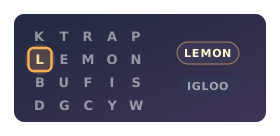
Stuck on a word? The hint button works in two steps: the first tap highlights the starting cell of an unfound word, a second tap fills the word in. Each hint adds a small time penalty, so save them for when you are really stuck.
Get the Mobile App
Prefer playing on the go? Word Search is also a free mobile app, the same game with controls made for touch, on the App Store and Google Play.


Tips & Tricks
- Start with rare letters Q, Z, X, J, and K rarely appear as filler; spotting one usually pins down its word.
- Find the first letter, then sweep its neighbors Two letters in a straight line give away the rest.
- Always check backward and diagonal Those directions hide words best from a left-to-right scan.
- Let the theme guide you Knowing the topic primes your eye for the words likely to be in the grid.
- Spend hints sparingly Each one costs thirty seconds, and the first tap only marks a word's start, which is often all you need.
Want to go deeper? Read our full guide to word search strategies for finding words faster.
Prefer solving on paper? Try our printable word search puzzles.
Frequently Asked Questions
Can words overlap?
Yes. The puzzle generator places words first and may share letters at intersections. A single letter cell can belong to two or more answers.
Can words go backward?
Yes. Words can run in any of the eight standard directions, including the four reverse ones.
Are there hints if I'm stuck?
Yes. The hint button reveals one unfound word automatically. There is a small time penalty added at the end for each hint used.
Does my progress save?
Yes. If you close the tab or reload mid-puzzle, your current grid, found words, and timer are restored when you come back. Best completion times are also stored locally. Everything is tied to that browser profile and won't carry across devices.
Is the game free?
Yes. It runs entirely in your browser with no sign-up required.
A Short History of Word Search
A surprisingly young puzzle: Norman Gibat printed the first known word search in 1968 in Norman, Oklahoma, while Spain's Pedro Ocon de Oro was creating the near-identical sopa de letras. Both spread through newspapers and puzzle books, and eventually onto screens like this one.